Featured Snippet: To create a custom Facebook Share button, define your custom sharing parameters—such as the title, URL, summary text, and thumbnail image—using PHP urlencode(). Then, create an HTML anchor tag with an onClick event that opens a popup window pointing to http://www.facebook.com/sharer.php, injecting your encoded PHP variables into the query string. This method allows you to completely customize the appearance and content of the Facebook sharing dialog box without relying on default Open Graph meta tags.
A common feature of Facebook is the use of being able to ‘Share’ objects whether these objects are videos, articles, or custom application links. If you’re anything like us, then you like to have full control over what and how you share it, which proved rather difficult until now. In this comprehensive web development tutorial, we are going to show you, in two easy steps, how to create a completely custom Facebook ‘Share’ button to use on your Facebook iFrame tab or website that will allow viewers to share and post your custom content directly to their Wall.
The difference between this tailored ‘Share’ button and the standard Facebook ‘Share’ button is that every semantic element (custom message, custom structural title, and custom thumb image) within the share window popup is completely customizable. This gives you total control over the marketing message and social graph presentation you want to share with your audience.
The Code Setup
To begin our custom integration, we will break the process down into two phases: preparing the dynamic PHP variables and constructing the HTML layout.
Step 1: PHP Parameter Configuration
First, we need to declare the necessary variables that will populate the Facebook sharing endpoint. We will utilize PHP's built-in URL encoding function to ensure all characters are properly escaped.
<?php
$title=urlencode('Title of Your iFrame Tab');
$url=urlencode('http://apps.facebook.com/youriframetab');
$summary=urlencode('Custom message that summarizes what your tab is about, or just a simple message to tell people to check out your tab.');
$image=urlencode('https://creativewebprogramming.com/images/posts/creativewebprogramming.com-how-to-create-a-custom-facebook-share-button.png');
?>
Each line within the PHP allows you to customize every element within the social share window. Every bit of coding within the parentheses effects those specific elements. To understand which PHP element affects what visual component, take a look at the screenshot below:
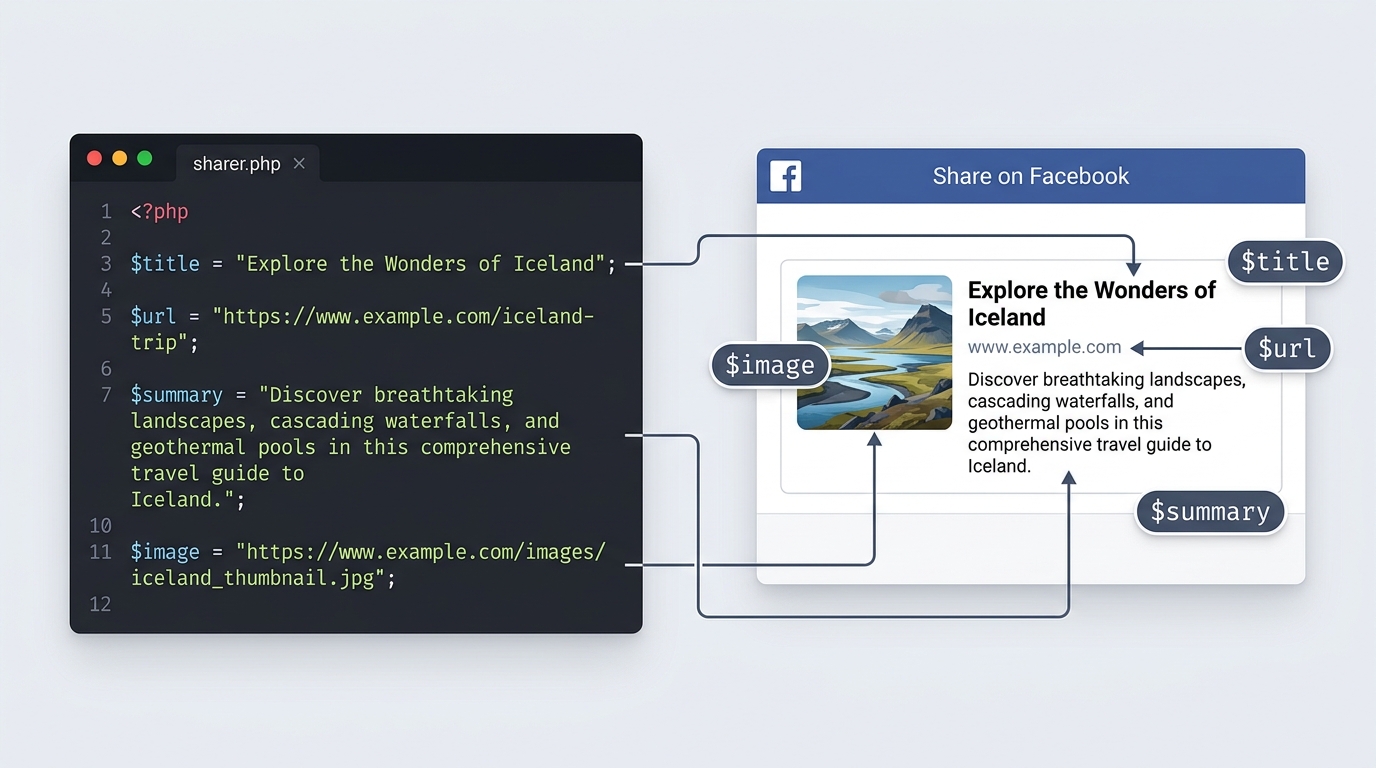
Keep note that the $url section must contain a valid absolute URL. This directs people to your application tab or landing page once the share has been successfully published on the poster’s social wall. Also, the $image must contain a full HTTP URL. If your link to the image is a relative path like “images/share-thumbnail.jpg”, it will not be read correctly because the share window crawler is coming from Facebook’s remote server, not your local web server. As for the size of your thumbnail image ($image), it will automatically be proportionately resized to fit either 100px wide or 100px tall (depending which measurement is larger of the original image aspect ratio). So ideally, you should make your thumbnail exactly 100px by 100px to prevent unwanted resizing or pixelation.
Step 2: XHTML Button Integration
Now that the backend variables are ready, we will construct the frontend trigger using standard HTML and a touch of JavaScript to handle the popup window behavior.
<a onClick="window.open('http://www.facebook.com/sharer.php?s=100&p[title]=<?php echo $title;?>&p[summary]=<?php echo $summary;?>&p[url]=<?php echo $url; ?>&&p[images][0]=<?php echo $image;?>', 'sharer', 'toolbar=0,status=0,width=548,height=325');" target="_parent" href="javascript: void(0)">Insert text or an image here. </a>
As you can see, the onClick="window.open('...');" function will create a new browser popup window that contains the parsed ‘Share’ information (see picture above). Do not change this core endpoint information. The only bits of coding you might need to change are the width and the height of the window frame (if you are not satisfied with the default measurements). These measurements define the width and height of the popup window containing the “Share” prompt.
The other bit of HTML markup you can modify is where it says; “Insert text or an image here”. This is where you can insert whatever HTML element you choose to become the clickable link. This can simply be plain text or a fancy graphical button that you designed yourself. The visual choice is entirely up to your website's design system!
Completed Final Code
For your convenience, here is the full code block combining both the PHP logic and the HTML markup. You can copy and paste this directly into your project files.
<?php
 $title=urlencode('Title of Your iFrame Tab');
$url=urlencode('http://apps.facebook.com/youriframetab');
$summary=urlencode('Custom message that summarizes what your tab is about, or just a simple message to tell people to check out your tab.');
$image=urlencode('https://creativewebprogramming.com/images/posts/creativewebprogramming.com-how-to-create-a-custom-facebook-share-button.png');
?>
<a onclick="window.open('http://www.facebook.com/sharer.php?s=100&p[title]=<?php echo $title;?>&p[summary]=<?php echo $summary;?>&p[url]=<?php echo $url; ?>&&p[images][0]=<?php echo $image;?>', 'sharer', 'toolbar=0,status=0,width=548,height=325');" href="javascript: void(0)" target="_parent">Share this awesome content!</a>
Important Implementation Notes
Your iFrame tab or source webpage must be a .php file in order for this server-side rendering to work properly on most standard web hosts.
Frequently Asked Questions
Can I customize the image for my Facebook share button?
Yes, by passing a full absolute URL to your custom thumbnail image in the $image PHP variable, you can completely customize the visual preview that displays when your content is shared on Facebook's network.
Why is my Facebook share thumbnail not showing up correctly?
Ensure that the image URL you provide is a full absolute URL (e.g., https://creativewebprogramming.com/images/posts/creativewebprogramming.com-how-to-create-a-custom-facebook-share-button.png) and not a relative path, as Facebook’s external servers need to be able to fetch the image directly.
Does my webpage need to be a PHP file to use this custom share button?
Yes, since this specific customization technique relies on URL encoding via PHP variables (such as $title, $url, $summary, and $image), your source webpage needs to support PHP rendering to output the correct dynamic values into the HTML anchor tag.
Troubleshooting & Support
If you are having problems getting this interactive web development tutorial to work properly, please reread the instructions above and try again, ensuring your file permissions and server environments support PHP. If you still cannot get it to work as intended, please leave us a comment below and our development team will respond as soon as possible with technical guidance.